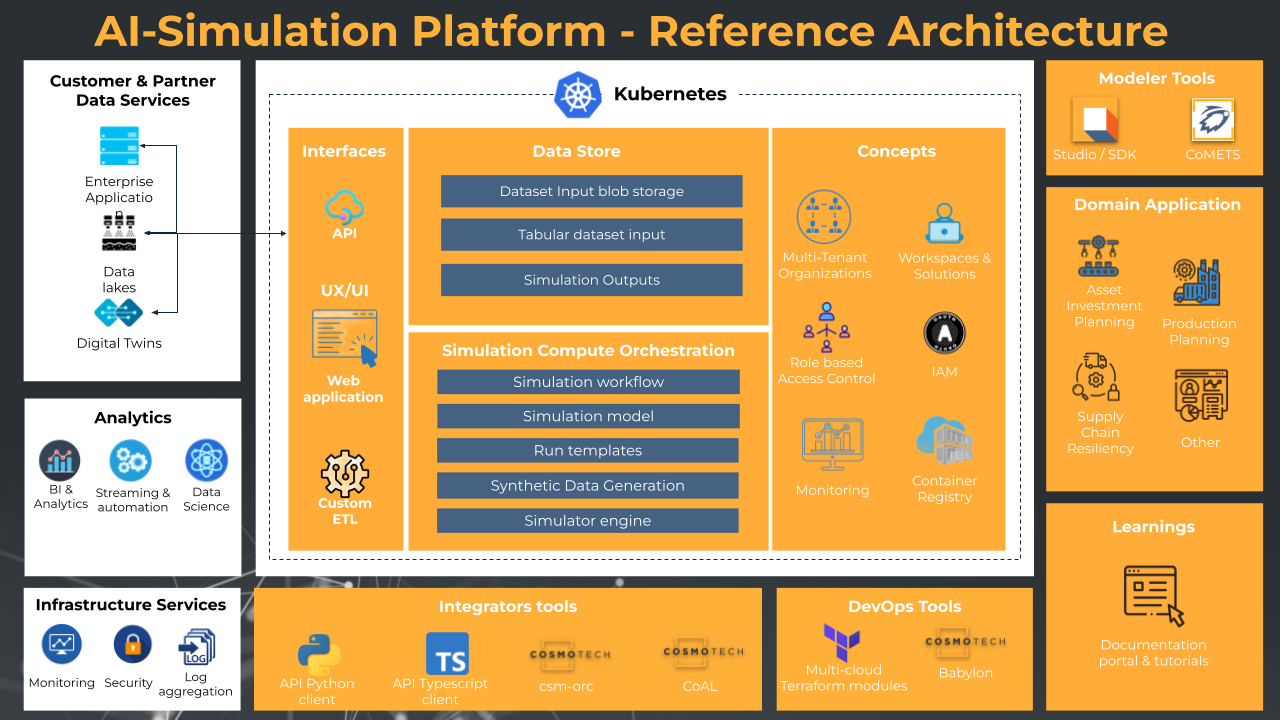
The Cosmo Tech cloud platform is primarily deployed on Microsoft Azure using a combination of managed services. The deployment process is structured into layers (Core, Organization, Workspace) and requires specific technical prerequisites regarding infrastructure, security, and tooling.
Deployment Methods
The platform can be deployed through several methods depending on the environment and customization needs:
- Azure Marketplace (Managed Application): This is the primary method for deploying the “Core Platform” services. It creates a managed application in your Azure subscription that is maintained by Cosmo Tech or a Cloud Solution Provider.
- Terraform: Alternatively, Terraform can be used for deploying Core Platform services.
Prerequisites for Deployment
Successfully deploying the platform requires meeting specific technical, security, and tooling requirements.
Azure Subscription and Permissions
- Subscription: A valid Azure subscription is required.
- Permissions: The deployer must have credentials to manage resources including AKS, ACR, ADX, Storage, Keyvault, and EventHub.
- Resource Groups: Two distinct resource groups are required to isolate resources: one for the core platform (common resources) and one for the platform tenant.
Networking
- Virtual Networks (VNet): Two distinct VNets are required—one for common resources and one for the tenant. These must be peered to allow communication.
- IP Constraints: The VNet must allow outbound connectivity and avoid specific IP ranges (e.g., 169.254.0.0/16). It is recommended to use a NetMaskLength of /26 minimum.
- Public IP/Domain: If external access via a domain name is required, a Static Public IP (Standard SKU) and a corresponding DNS “A record” must be created.
Identity and Security (Azure AD App Registrations)
Multiple Azure AD App Registrations must be created in the customer tenant to manage authentication and permissions.
- Cosmo Tech Platform: The main registration defining available roles (e.g., Platform Admin, Organization User).
- Swagger: For discovering and testing the Platform API.
- Network: Used for custom Virtual Network configurations.
- Babylon: Used for the CLI tool managing solutions.
- Business Web App (Optional): Required if deploying the web application for end-users.
- Permissions: These apps require specific API permissions, such as Microsoft Graph > User.Read.
Power BI (Optional)
If the solution utilizes Power BI for reporting, specific licensing and configurations are needed:
- Licensing: A Power BI Pro or Premium Per User (PPU) license is required for creating/editing reports.
- Embedding Modes:
- SSO: Requires users to have Power BI credentials.
- Service Principal: Allows users to view reports without a Power BI account but requires a technical account/Service Principal.
DevOps Tools
The following tools are necessary for deployment and maintenance tasks:
- Azure CLI: For interacting with Azure resources.
- Terraform: For infrastructure deployment.
- Helm: For Kubernetes package management.
- Kubectl & K9s: For interacting with the Kubernetes cluster.
- Docker: For building and pushing simulation images.
- Babylon: A locally installed command-line interface (CLI) tool used by Cosmo Tech DevOps engineers to interact with platform systems and automate the deployment of solutions and Azure resources.